

CPIXML Import/Export
Generates BIM-route structures from cross-sections and 3D surfaces from DTMs; import/export project data incl. structures (volumes) and quantity positions from REB-methods in the CPIXML format (data exchange RIB iTWO, ceapoint DESITE etc.). Model visualization and exchange via card_1 DESITE share.
DGN Export
Output of card_1 drawings in DGN (MicroStation) format.
DGN Import
Import of data in DGN format as drawings or plan view data.
DXF Export
Output of card_1 drawings in DXF (AutoCAD) format.
DXF Import
Import of data in DXF (AutoCAD) format as drawings or plan view data.
DWG Export
Output of card_1 drawings in DWG (AutoCAD) format. Requires module DXF Export.
DWG Import
Import of data in DWG (AutoCAD) format as drawings or plan view data. Requires module DXF Import.
IFC Import/Export
Generating BIM route structures from cross-sections and 3D surfaces from DTMs; Importing/exporting IFC objects to exchange 3D project data incl. engineering structures (spatial structures) and quantity records from REB methods in BIM projects. The basis is IFC version 4.0 or 4.1. Model visualization and transfer via card_1 DESITE share.
LandXML Import/Export
Import and export terrain models, alignments, vertical alignments and cross-sections in the LandXML format.
ALKIS Import
Import and revise the official geobasis data: land survey register and real estate register (ALKIS®), topographic data (ATKIS®) and fixed points (AFIS®) according to the AdV's AAA model. Preview on-screen. Updates with revised data.
Land Survey Register Preparation
If you work with land acquisition, land usage or land consolidations, importing the necessary initial data is as simple as a mouse click. Working with land parcels, you need not only the geometry, but also the land registers, property owners, type of land usage and various other data from the real estate registers.
If the data is available electronically, you can not only import it easily, but you can also decide whether to import all or only a part of the data in order to keep your project data to a minimum.
The data is automatically compared with existing data while being imported. If, for example, a land register already exists for the project, it will not be imported again but will merely be updated should it contain additional information.
Overlapping deliveries can be safely imported without any problems. The data of the land acquisition database are linked to graphics data if available. ALK (real estate maps) and ALB (real estate registers) therefore form one cohesive data unit within card_1.
ASCIBAHN Import/Export
Import and export of alignments, switches, cants, cross-falls and vertical alignments. Available formats: ASCIIBAHN 3.0 (Maglev), VERM.ESN (binary), GND-EDIT.
CityGML Import
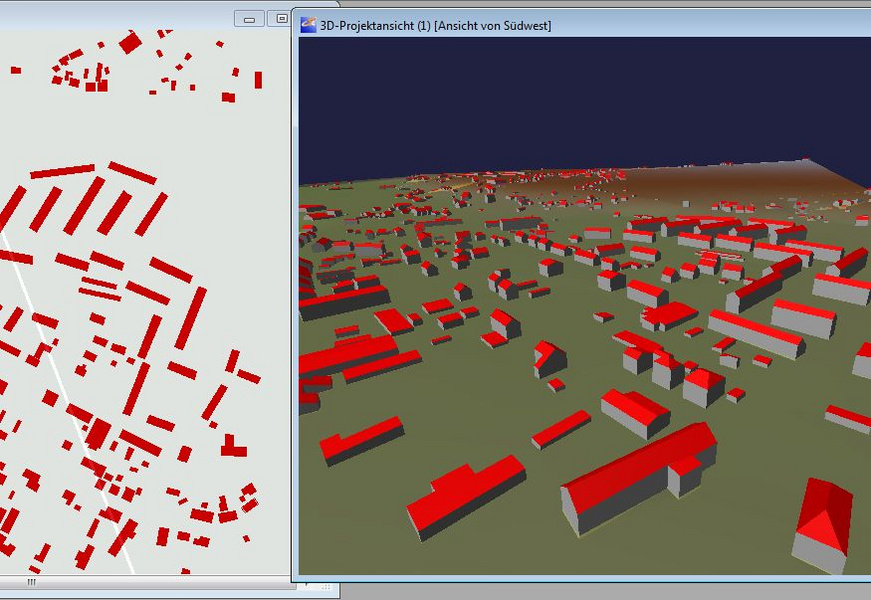
Import 3D-building data (3D-city models). Visualize in card_1 in e.g. the 3D-project view. Transformation into project coordinates-system 'on the fly'(requires the Transformation module).
GEOgraf Import
Import data in the GEOgraf format as base map data.
GIS Import
The Import Shape Data interface is an easy to use tool to import GIS data and WFS data into card_1.
Design objects are also based on the data of the existing conditions. These are managed in geographical information systems. Nature reserves, conservation areas, water conservation areas, flood areas, administrative borders as well as road and other data are examples of data compiled in such systems.
Products from the ESRI(r) ArcGIS family are so common that the Shape format has basically established itself as the standard data exchange format. Some of the German federal states' environmental authorities even provide free access to Shape data on the internet.
You can seamlessly import any geometric and attribute data into your card_1 project using the new Import Shape Data card_1 module. The interface enables you to import points, polygons and areas as well as any object attributes making it very easy to include this geographical information while designing and creating drawings with card_1. You can access the attributes to run analyses and other evaluations within card_1.
OKSTRA Export Design
Export card_1 data (schematics: 008 – design, 018 – geometry, 021 – general. Geometry objects incl. point clouds, 022 – land acquisition (requires Land Acquisiton Logging module), 024 – Cadastre, 030 – topography) in the OKSTRA format.
OKSTRA Import Design
Import data (schematics: 008 – design, 018 – geometry, 021 – general. Geometry objects incl. point clouds, 030 – topography) in the OKSTRA format.
Sewer Data Import/Export
Import of sewer data from ISYBAU Format Typ K/EY and Im-/Export of sewer data in ISYBAU Format XML.
SoundPLAN Export
Export topographic and planning data to the program SoundPLAN.